 Drive and Maintain
Choose the rules
Settings → Drivers' hours
UK (the default), EU, AETR, GB domestic, USA, Canada and Australia, or your own figures. Every figure can be changed: driving before a break, the break, split breaks, daily and weekly driving, longer days and rests.
- Open Settings → Drivers' hours.
- Choose the region, or change any figure.
- Choose spoken reminders, lock-screen alerts and the first warning (15, 30 or 45 minutes).
- Lorries
- Car transporters
- Buses
- Cranes
On a trip
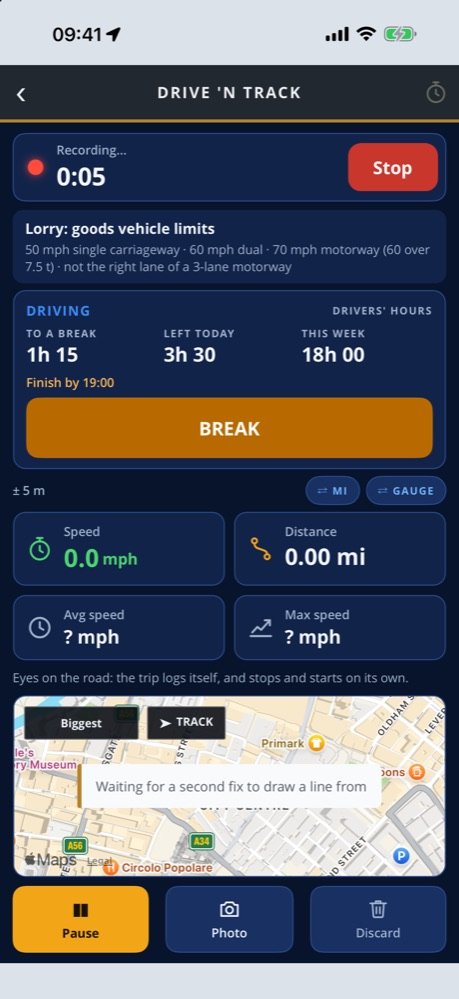
Drive 'n Track with a lorry
A lorry trip shows the driving left before the next break, today and this week. The clock never stops on its own in traffic: only BREAK or finishing the trip stops it.
- Start a trip with the lorry.
- Press BREAK when you stop for a break; the trip pauses.
- Press END BREAK to carry on.
- Reminders are spoken before a break is due and when it is long enough.
The tachograph is the record that counts. The app is a plan from your trips and the buttons you press.
- Lorries
- Car transporters
- Buses
- Cranes
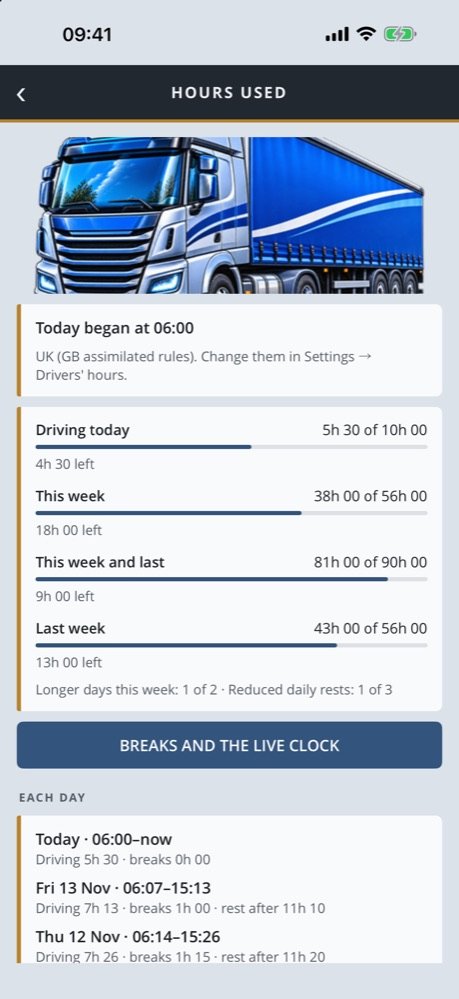
Hours used
Dashboard → Logs & reports → Hours Used
Today, this week, last week and the fortnight as bars against the rules, longer days and reduced rests used, and each duty day and week from the log, eight weeks back.
- Open Hours Used.
- Scroll for each day: start and finish, driving, breaks and the rest after.
- Share the hours sends them as text.
- Lorries
- Car transporters
- Buses
- Cranes
Drivers' hours screen
Dashboard → Lorry & HGV → Drivers' Hours
The live clock outside a trip, the break, and when the day must end.
- Open Drivers' Hours to take or end a break without a trip running.
- Lorries
- Car transporters
- Buses
- Cranes
