 Drive and Maintain
A tachograph records what a lorry or bus driver is doing. To use one properly, you need to know its symbols, and when to record something by hand.
The four activities
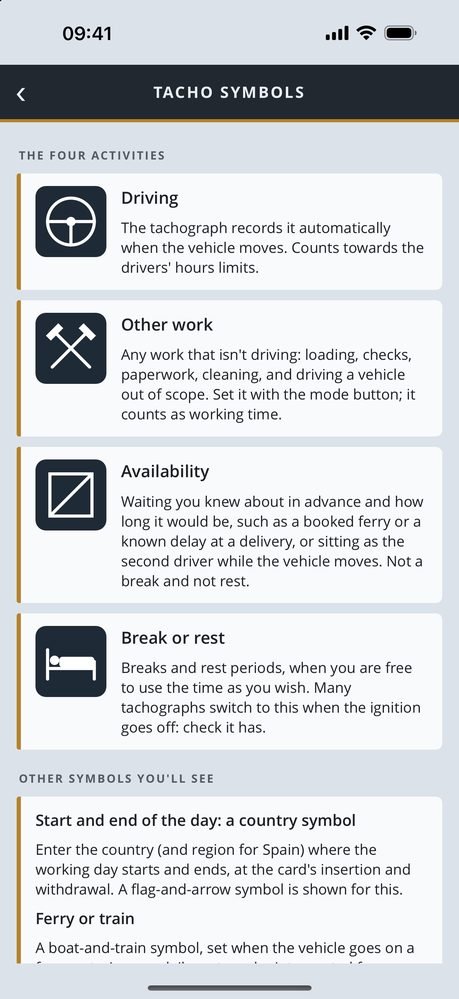
- Driving: a steering wheel. Recorded automatically when the vehicle moves.
- Other work: crossed hammers. Loading, unloading, checks, paperwork, and driving a vehicle that isn't in scope.
- Availability: a box with a diagonal line. Waiting time when you know in advance how long you'll wait, such as travelling as a second driver, or waiting at a ferry.
- Rest: a bed. Breaks and rest periods.
Set the right mode whenever you stop: if you leave it on other work during your break, the break may not count.
Manual entries
When you're away from the vehicle, the tachograph doesn't know what you've been doing. On a digital tachograph, when you insert your card, you make a manual entry for the time since you last removed it: other work, availability or rest.
Common reasons:
- Work before you got to the vehicle, such as other work at the depot.
- Rest or time off between duties.
- A card fault, or driving without the card: then you print out and write the details on the back of the printout.
Get it right
Records can be checked at the roadside and by the operator. Missing or wrong records can mean fines, even when the hours themselves were fine.
DVSA's guidance has the full detail.
In the app
Drive and Maintain explains the tachograph's symbols and manual entries, alongside the drivers' hours, the Driver CPC and the tachograph card.
MOT, tax, insurance and service reminders
Reminders before every date runs out, mileage and fuel tracked with your real MPG, and the service history kept, for every vehicle you look after.