 Drive and Maintain
If you're injured and can't speak, the people helping you want to know who to call and anything medical they need to know. Your phone can tell them, if you set it up.
Emergency contacts
Add an emergency contact on your phone. On an iPhone, the Medical ID in the Health app holds your emergency contacts and medical details, and can be shown on the lock screen without your passcode.
The old idea of saving a contact as ICE ("in case of emergency") still helps, too.
Medical details
Add what someone treating you needs to know:
- allergies, especially to medicines;
- medical conditions, such as diabetes or epilepsy;
- medicines you take; and
- your blood type, if you know it.
In the car
Keep your breakdown cover's number and your insurance claims line saved too. In a stressful moment, finding them quickly matters.
Emergency SOS
Learn your phone's emergency SOS shortcut, which calls the emergency services and can alert your contacts.
Text 999
If you can't speak, or signal is weak, you can text 999, but you need to register first: text register to 999.
Keep it up to date
Check your emergency contacts and details now and then: numbers change.
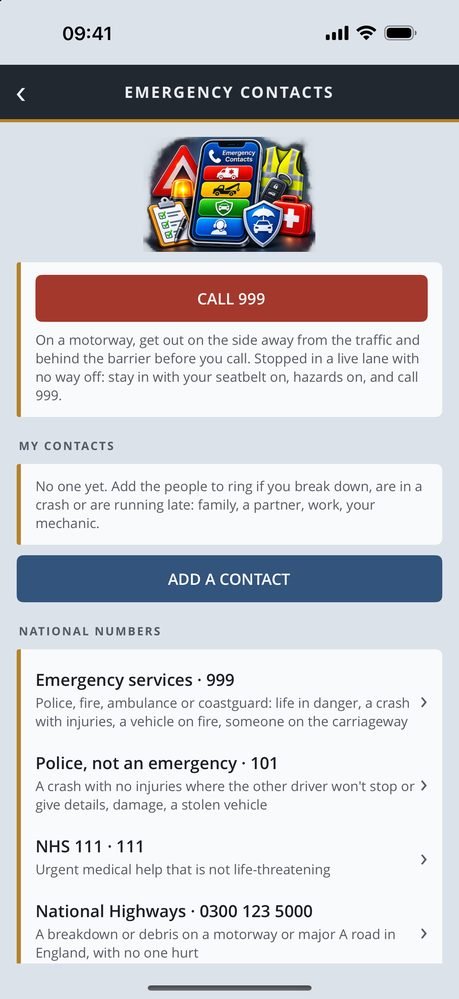
In the app
Drive and Maintain keeps your emergency contacts and the national numbers, alongside your breakdown cover and insurance details.
MOT, tax, insurance and service reminders
Reminders before every date runs out, mileage and fuel tracked with your real MPG, and the service history kept, for every vehicle you look after.